

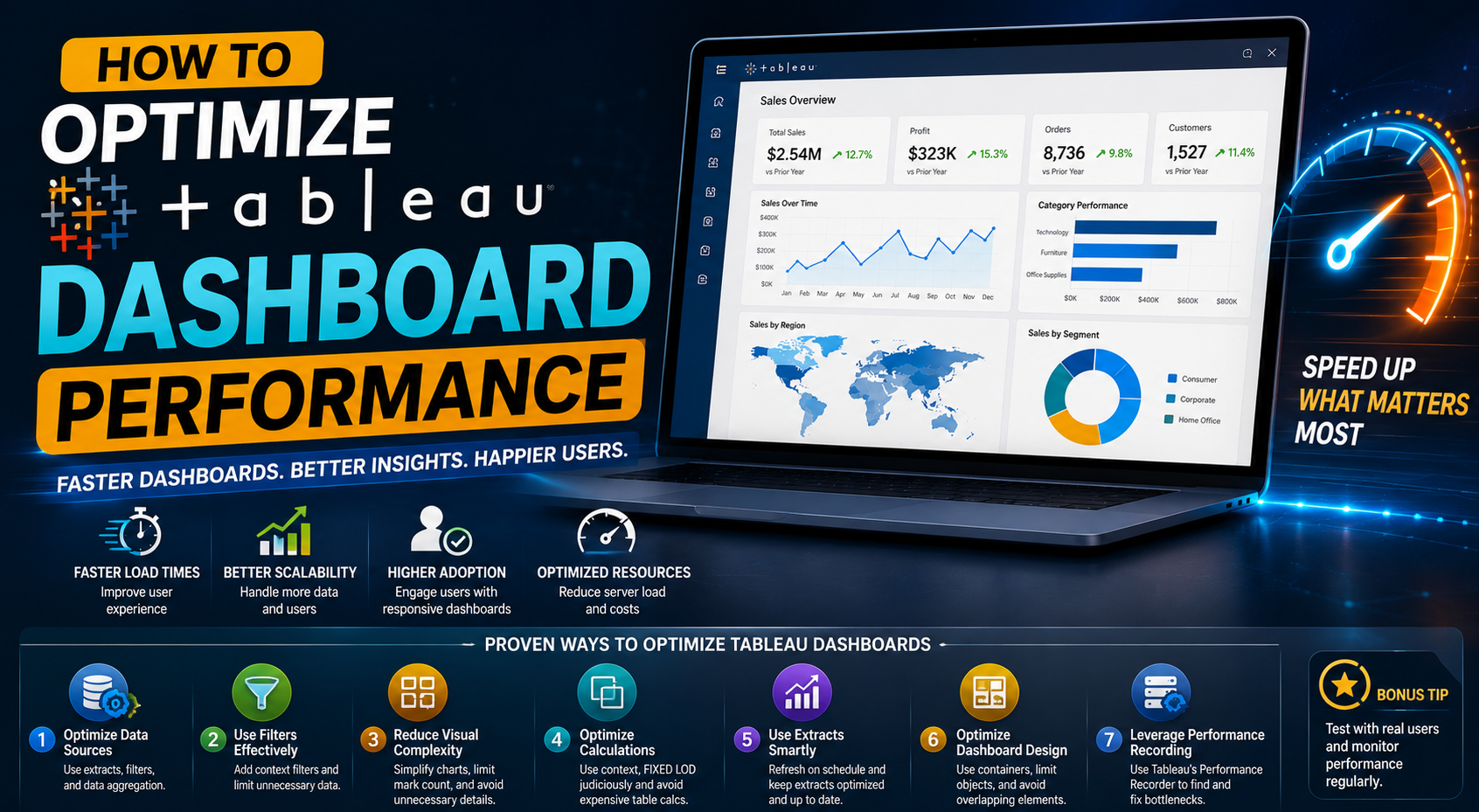
Modern organizations rely on interactive dashboards to monitor KPIs, analyze operational performance, centralize reporting workflows, and support data-driven decision-making. As enterprise analytics environments continue to grow, businesses increasingly depend on Tableau to deliver scalable data visualization and business intelligence solutions across departments.
However, as dashboards become more complex and datasets grow larger, many organizations begin facing performance issues that negatively impact reporting efficiency and user experience. Slow dashboards, delayed filters, overloaded visualizations, inefficient calculations, and unoptimized queries can significantly reduce the effectiveness of analytics environments. Users often become frustrated when dashboards take too long to load or fail to provide real-time visibility into business performance.
Dashboard performance is no longer just a technical concern. It directly affects operational efficiency, executive reporting, analytics adoption, and business decision-making.
Organizations that optimize Tableau dashboard performance gain advantages in:
- Reporting responsiveness
- Analytics scalability
- Operational visibility
- User adoption
- Enterprise reporting efficiency
In this guide, we will explore how businesses can optimize Tableau dashboard performance, improve scalability, reduce latency, and build faster enterprise analytics environments in 2026.
Why Tableau Dashboard Performance Matters
Dashboard performance has a major impact on how organizations interact with business intelligence systems. A slow or unresponsive dashboard can create operational bottlenecks that reduce trust in analytics workflows. Executives, analysts, and operational teams rely on dashboards for quick access to insights. When reports take too long to load, decision-making slows down and analytics adoption decreases.
Performance issues commonly affect:
- Executive dashboards
- Operational monitoring systems
- Financial reporting
- Sales analytics
- Marketing dashboards
- Real-time reporting environments
Efficient Tableau dashboards improve:
- Reporting speed
- User experience
- KPI visibility
- Operational monitoring
- Enterprise scalability
- Decision-making efficiency
Fast dashboards encourage greater analytics adoption and improve how teams interact with data across the organization.
Common Causes of Slow Tableau Dashboards
Many Tableau performance problems are caused by architecture decisions made during dashboard development. Businesses often focus heavily on visual design while overlooking the technical structure behind dashboard performance. Several factors commonly contribute to slow Tableau environments.
Large and Unoptimized Data Sources
One of the most common causes of poor dashboard performance is excessive data volume. Many organizations connect Tableau dashboards directly to large operational databases containing millions of rows without optimizing the reporting layer. When dashboards query unnecessary columns, historical records, or unfiltered datasets, performance can degrade significantly.
Large datasets increase:
- Query execution time
- Dashboard rendering delays
- Filter latency
- Server workload
- Refresh duration
Businesses should structure analytics environments around optimized reporting datasets rather than raw operational tables whenever possible. Reducing unnecessary data improves dashboard responsiveness and scalability.
Too Many Visualizations on a Single Dashboard
A common mistake businesses make is overcrowding dashboards with excessive charts, filters, maps, and KPI visuals. Although organizations often assume more visualizations improve reporting quality, overloaded dashboards frequently create slower rendering and poor usability.
Every visualization adds processing overhead to the dashboard environment. When dashboards contain too many components simultaneously, Tableau must process multiple queries, filters, and rendering operations at once.
This impacts:
- Dashboard load speed
- User interaction responsiveness
- Mobile performance
- Scalability
Simplified dashboard layouts improve both usability and analytics efficiency. Organizations should focus on visual clarity and actionable insights instead of trying to display every metric on a single page.
Inefficient Calculated Fields
Calculated fields are powerful within Tableau environments, but poorly designed calculations can significantly slow dashboard performance. Complex calculations executed repeatedly across large datasets increase processing time and create unnecessary workload on reporting systems.
Many businesses build dashboards using excessive nested calculations, inefficient logic, or duplicated formulas without optimization. This becomes especially problematic in enterprise analytics environments where dashboards support large operational datasets.
Optimized calculations improve:
- Dashboard responsiveness
- Query efficiency
- Visualization speed
- Reporting scalability
Excessive Use of Live Connections
Live database connections provide real-time visibility into operational data, but they can also introduce performance challenges if not managed correctly. Dashboards using live connections depend heavily on database responsiveness, query efficiency, and infrastructure scalability.
If the underlying database environment is not optimized, Tableau dashboards may experience slow loading times, delayed filtering, query bottlenecks, refresh issues, and inconsistent performance. Choosing the right connection strategy is critical for scalable reporting environments.
Poor Dashboard Design Structure
Dashboard design has a direct impact on performance. Many businesses focus entirely on aesthetics without considering how layout complexity affects rendering efficiency.
Issues such as:
- Excessive floating objects
- Multiple nested containers
- Overloaded filters
- Large image files
- Unnecessary formatting
- Excessive sheets
can slow dashboard rendering significantly. Clean dashboard architecture improves performance while enhancing user experience. The most effective dashboards prioritize simplicity, usability, and reporting clarity.
How Tableau Extracts Improve Performance
One of the most effective ways to optimize Tableau performance is through the use of Tableau Extracts. Extracts create optimized snapshots of data specifically designed for analytics and reporting workflows. Unlike live connections, extracts reduce dependency on operational databases during dashboard interactions.
This improves:
- Dashboard loading speed
- Filter responsiveness
- Query efficiency
- Scalability
- Overall reporting performance
Extracts are particularly valuable for enterprise reporting environments handling historical datasets, large transactional systems, operational analytics, executive reporting, and cross-functional dashboards. Businesses can also schedule extract refreshes to maintain updated reporting environments without sacrificing performance.
Optimizing Data Models for Tableau
A strong data model is one of the most important foundations of high-performing Tableau dashboards. Poorly structured data models often create inefficient joins, duplicated calculations, slow queries, inconsistent KPIs, and scalability issues.
Businesses should structure reporting environments around optimized analytics models instead of directly querying raw operational systems. Best practices include:
- Reducing unnecessary columns
- Simplifying relationships
- Removing duplicated fields
- Minimizing complex joins
- Organizing semantic structures
Well-designed data models improve dashboard performance while creating more scalable analytics ecosystems.
Reducing Filter Complexity
Filters are essential for interactive dashboards, but excessive filtering can negatively affect performance. Each filter adds processing overhead to the dashboard environment. Dashboards containing numerous cascading filters, high-cardinality filters, or complex dynamic filtering logic often experience slower interactions and delayed rendering.
Businesses should prioritize:
- Relevant filters only
- Simplified interactions
- Optimized filter logic
- Reduced filter dependencies
Efficient filtering improves usability while reducing dashboard processing time.
Optimizing Tableau Server & Cloud Environments
Dashboard performance is not limited to workbook design alone. Infrastructure also plays a major role in analytics responsiveness. Organizations using Tableau Server or Tableau Cloud should regularly optimize server environments to support scalable reporting workloads.
Performance improvements may include:
- Resource allocation optimization
- Background process management
- Extract scheduling optimization
- Workload balancing
- Infrastructure scaling
- Governance management
As analytics adoption grows across departments, infrastructure optimization becomes increasingly important for maintaining consistent reporting performance.
Improving Dashboard User Experience
Performance optimization should not focus solely on technical speed. User experience also plays a critical role in dashboard effectiveness. A fast dashboard with poor usability still creates operational friction.
Organizations should design Tableau dashboards that provide:
- Intuitive navigation
- Focused KPI visibility
- Simplified interactions
- Responsive filtering
- Clear visual hierarchy
- Business-focused reporting
User-centered design improves adoption while helping stakeholders interact with analytics more efficiently.
Governance & Standardization for Scalable Performance
Many enterprise performance problems occur because dashboards are built without centralized governance frameworks. As organizations expand analytics adoption, they often encounter duplicated reports, inconsistent calculations, dashboard sprawl, uncontrolled data sources, and fragmented KPI definitions.
Governed analytics environments improve performance consistency and scalability. Organizations should establish:
- Standardized dashboard frameworks
- Governed semantic models
- Centralized reporting standards
- Optimized development practices
- Enterprise BI governance policies
This creates more maintainable Tableau ecosystems capable of supporting long-term analytics growth.
Real-Time Analytics vs Performance Balance
Many businesses attempt to make every dashboard fully real-time without evaluating the operational impact. Although real-time reporting can improve visibility, excessive live querying often reduces dashboard responsiveness.
Organizations should carefully evaluate where real-time analytics is truly necessary. For some reporting workflows, scheduled extracts provide a better balance between reporting freshness, scalability, infrastructure efficiency, and dashboard responsiveness. Strategic reporting architecture helps businesses maintain both performance and operational visibility.
How AI & Modern Analytics Are Changing Tableau Performance Strategies
As enterprise analytics environments evolve, AI-powered optimization and cloud analytics architectures are increasingly influencing Tableau performance strategies.
Modern analytics ecosystems now prioritize:
- Centralized data platforms
- Cloud-native scalability
- Governed reporting environments
- AI-assisted analytics
- Intelligent query optimization
- Automated workload management
Organizations adopting modern analytics infrastructures can create more scalable Tableau ecosystems capable of supporting advanced enterprise reporting requirements in 2026 and beyond.
Business Outcomes of Optimized Tableau Dashboards
Organizations that invest in dashboard optimization experience significant business benefits. Improved Tableau performance helps businesses achieve:
- Faster reporting workflows
- Improved executive visibility
- Better user adoption
- Scalable analytics operations
- Reduced operational delays
- Improved dashboard responsiveness
- Enhanced decision-making efficiency
- Centralized reporting scalability
Fast dashboards improve how organizations interact with analytics systems and support more effective business intelligence operations.
Why Businesses Choose KnexBI for Tableau Optimization
KnexBI helps organizations build scalable Tableau analytics ecosystems optimized for enterprise reporting, dashboard performance, and centralized business intelligence workflows.
Our expertise includes:
- Tableau dashboard optimization
- Analytics architecture
- Enterprise BI implementation
- Data modeling
- Reporting automation
- Tableau performance tuning
- Governance frameworks
- Scalable visualization systems
- Centralized analytics workflows
We help businesses transform slow and fragmented reporting environments into high-performance analytics ecosystems designed for modern enterprise decision-making.
How To Optimize Tableau Dashboard
Optimizing Tableau dashboard performance is essential for organizations seeking scalable business intelligence, responsive analytics workflows, and enterprise reporting efficiency. Slow dashboards reduce adoption, limit operational visibility, and negatively impact decision-making across organizations.
Businesses that focus on optimized data models, efficient dashboard architecture, scalable reporting environments, governance frameworks, and performance-focused analytics strategies can create significantly more effective Tableau ecosystems.
As analytics environments continue evolving in 2026, dashboard performance optimization will remain a critical component of successful enterprise business intelligence operations.